Programs become interesting when they react to data. In VisuAlg, decisions use the se structure, which reads almost like plain Portuguese: se (if) a condition is true, entao (then) do something, senao (else) do something different.
The simple form
se idade >= 18 entao
   escreval("Maior de idade")
fimse
Every se must close with fimse. Forgetting it is the most common syntax error in conditional code.
Adding an alternative
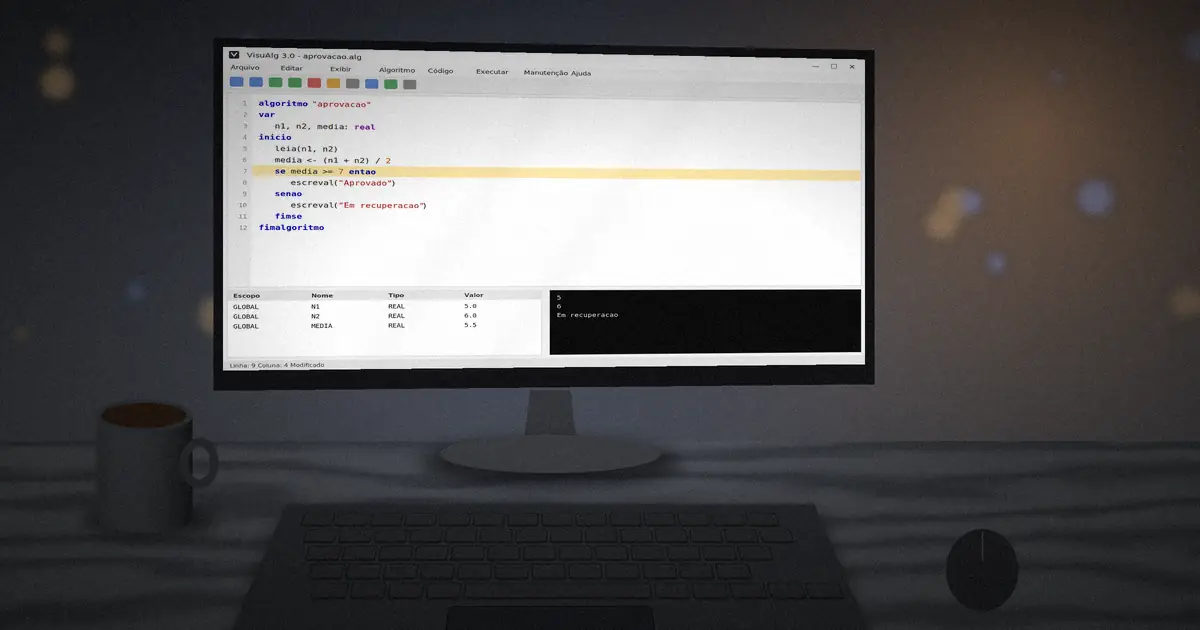
algoritmo "aprovacao"
var
   n1, n2, media: real
inicio
   leia(n1, n2)
   media <- (n1 + n2) / 2
   se media >= 7 entao
      escreval("Aprovado com media ", media:4:1)
   senao
      escreval("Em recuperacao")
   fimse
fimalgoritmo
Comparison and logical operators
| Operator | Meaning |
|---|---|
= | equal to |
<> | different from |
> < >= <= | greater, less, greater or equal, less or equal |
e | both conditions must be true |
ou | at least one must be true |
nao | inverts the result |
se (nota >= 7) e (faltas <= 10) entao
   escreval("Aprovado")
fimse
Use parentheses around each comparison when you combine them. It makes the order of evaluation obvious to you and to the interpreter.
Nested decisions
You can place one se inside another to test several ranges:
se media >= 7 entao
   escreval("Aprovado")
senao
   se media >= 4 entao
      escreval("Recuperacao")
   senao
      escreval("Reprovado")
   fimse
fimse
Many options with escolha
When you compare one variable against several fixed values, escolha is cleaner than a stack of nested se blocks:
escolha opcao
caso 1
   escreval("Somar")
caso 2
   escreval("Subtrair")
caso 3, 4
   escreval("Multiplicar ou dividir")
outrocaso
   escreval("Opcao invalida")
fimescolha
Draw the flowchart first. A diamond for each condition and an arrow for each outcome shows you whether a branch is missing before you write a single line.
Practice ideas
- Read three numbers and print the largest.
- Classify a triangle as equilateral, isosceles or scalene.
- Build a menu with
escolhafor a simple calculator.
Next step: repeat actions automatically with loops in VisuAlg.